

Using Large Language Models to Parse and Read Order Emails from Outlook and Gmail
Every day, small business get hundreds of orders through emails, and employees have to professionals sift through countless emails, manually typing a filling in work orders, searching for important messages buried beneath spam, promotions, and automated notifications. Despite advancements in email filtering and search capabilities, efficiently managing an overflowing inbox remains a significant challenge. This project explores how ChatGPT API can assist businesses in automatically parsing, categorizing, and extracting order information from emails from their clients, not needing human intervention.
By leveraging natural language processing (NLP) techniques, how can one build an intelligent email processing pipeline capable of performing preliminary filtering, much like how spam filters or smart inboxes work before an email reaches a user’s primary inbox?
What Does the Project Do?
The Email Order Summarization Tool is a Python-based application that connects to the Gmail and Outlook API, retrieves emails based on specific criteria (e.g., timeframes, keywords), and organizes the data into a structured format using Pandas. Here’s what it can do:
- Fetch Emails:
- Connects to Gmail or Outlook using OAuth 2.0 for secure authentication
- Retrieves emails from specific times (e.g., October 2023 and November 2023)
- Filters emails containing specific keywords (e.g., “program”, “order”)
- Extract Key Information:
- Extracts the following info:
- sender
- date of email
- subject
- message body
- date/time
- Extracts the following info:
- ChatGPT Powered Summarization:
- If the email contains information about ordering an item from the business it extracts the following info:
- Item
- Origin of Production
- Quantity
- Weight
- Unit
- Packaging
- Order Delivery Address
- Order Delivery Date
- Order Delivery Time
- If the email contains information about ordering an item from the business it extracts the following info:
- Store and Analyze Data:
- The extracted data is then stored into a Pandas DataFrame
- Provides options to export the data to CSV or perform further analysis
Key Components
1️⃣ Login to customer emails and accessing OAuth for clients
2️⃣ Email extraction component filters, sort by date, sort by filter word
3️⃣ ChatGPT Prompt engineering – What do I get chatgpt to extract for me? What do I need, what dont I need?
Login via OAuth
1. Fetching Emails with Gmail API
This is sample code functions to get the gmail service credentials from the gmail oauth api
from google.auth.transport.requests import Request
from google.oauth2.credentials import Credentials

from google_auth_oauthlib.flow import InstalledAppFlow, Flow
from googleapiclient.discovery import build
from googleapiclient.errors import HttpError

# Authenticate and build the Gmail service
def get_google_auth_flow(redirect_uri, state=None):
    return Flow.from_client_secrets_file(
        CLIENT_SECRETS_FILE,
        scopes=SCOPES,
        state=state,
        redirect_uri=redirect_uri
    )

def get_gmail_service(session):
    credentials = session.get('credentials')
    if not credentials:
        return None
    creds = Credentials(
        credentials['token'],
        refresh_token=credentials.get('refresh_token'),
        token_uri=credentials['token_uri'],
        client_id=credentials['client_id'],
        client_secret=credentials['client_secret'],
        scopes=credentials['scopes']
    )
    if creds.expired and creds.refresh_token:
        creds.refresh(Request())
        # Update session with new token
        session['credentials'] = {
            'token': creds.token,
            'refresh_token': creds.refresh_token,
            'token_uri': creds.token_uri,
            'client_id': creds.client_id,
            'client_secret': creds.client_secret,
            'scopes': creds.scopes
        }
    return build('gmail', 'v1', credentials=creds)
2. Fetching Emails with Outlook API
from msal import ConfidentialClientApplication, PublicClientApplication


# Authenticate and build the Outlook service
def login_outlook():
    auth_url = msal_client.get_authorization_request_url(SCOPES, redirect_uri=REDIRECT_URI)
    return redirect(auth_url)
User UI – Email Filters
The user is then able to select the start and end date of the emails, choose the unread emails and even query the call by subject

The web app then gets back the message and allows the user to download the messages into a csv format
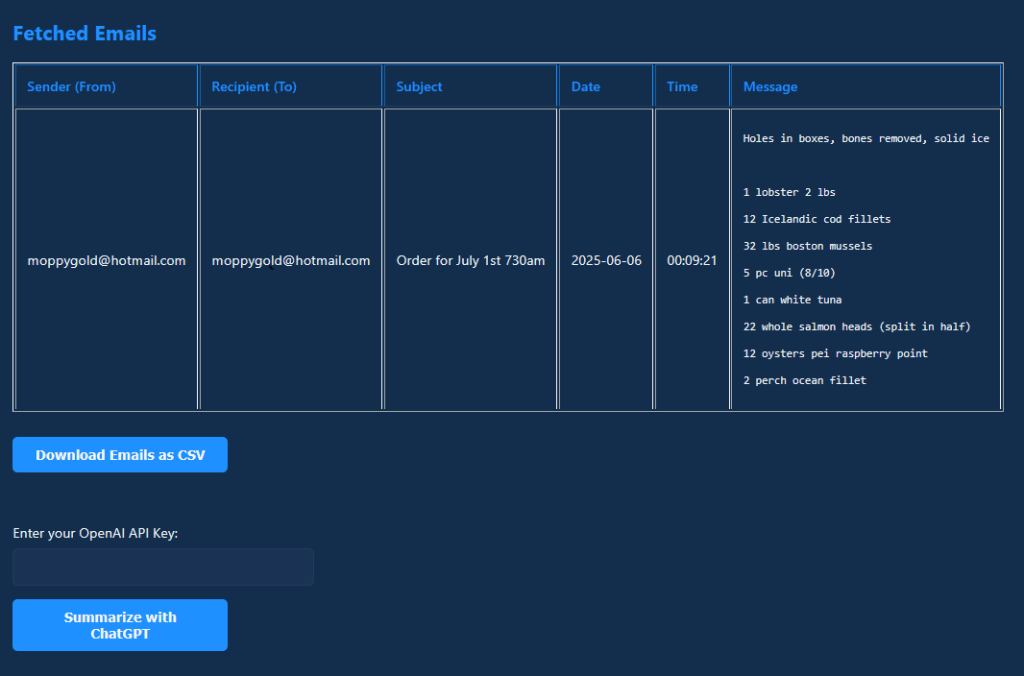
Example of an order
At this point the user can choose to
- Download the email as CSV
- Summarize the Email with ChatGPT
ChatGPT Prompt Engineering
🔹 Using ChatGPT API:
import openai

def extract_entities(email_text):
    response = openai.ChatCompletion.create(
        model="gpt-4o-mini-2024-07-18",
        messages=[
            {"role": "developer", "content": "You are an assistant that is responsible for converting emails regarding order information into csv tables. I will provide an email to you. If this email does not include order information, return nothing. Provide the date in this format YYYY-MM-DD. Provide the time in 24 hour format."},
            {"role": "user", "content": email_text}
        ]
    )
    return response["choices"][0]["message"]["content"]
Text Summarization: Generating Email Previews
A common challenge in email management is quickly understanding the gist of a long message. Using ChatGPT API, we can generate concise email summaries or json formats, into exactly what the user is looking for.
The ChatGPT response goes as the following:

It will read the order invoice then split the order into the columns. Splitting it up into the grading as well as the order delivery date and time
Post-Deployment Monitoring & Real-World Applications
Once deployed, this system can assist professionals, customer service teams, and executives in managing emails more effectively automatically reading their emails for work orders and sync them into SAP or other work order systems.
By integrating ChatGPT or DeepSeek-powered email parsing into productivity tools, we can reduce inbox overload and streamline communication—allowing users to focus on what truly matters.
💡 Future Enhancements
🚀 Fine-tune GPT models – Train a custom ChatGPT or DeepSeek model on domain-specific email content, building a custom chatbot using RAG
🚀 Update the UI – The focus of this project was to demonstrate the chatGPT capabilities, but making it more usable by clients would be the next step


 Jeremy Cheung Portfolio