

The integration of computer vision into logistics and on-demand services has opened avenues for automation and efficiency at scale. Leveraging advanced OCR (Optical Character Recognition) techniques to quickly process new driver registrations and their information, ensuring accurate data extraction while minimizing manual effort.
Problem Overview
The objective of this project was to automate the driver registration process by using computer vision and OCR. Specifically, the task involves detecting the presence of a driver license in an image, ensuring proper orientation and size, and extracting key information such as name, address, expiry date and license number. This reduces the manual review time and allows us to set reminders for drivers to renew their license, keeping the platform safe from fraud and from abusing the system.
Step 1: Detecting a Driver License in an Image
Often drivers upload images that are not driver licenses. To ensure the image contains a driver license, object detection models can be utilized to locate and isolate rectangular regions of interest.
Given that most driver licenses in the world have a consistent aspect ratio, additional validation can be applied post-detection. For instance:
- Aspect Ratio Analysis: If the detected rectangle deviates significantly from the typical dimensions of a driver license (e.g., 1.585:1 for U.S. licenses), it can be flagged as a false positive.
If we know which country the driver license comes from, then we are able to determine standard features that come along with that driver license. For example in Malaysia:

Competent Driver License Above

Vocational Malaysia Driver License Above
Preprocessing for Orientation
To ensure proper text recognition by OCR, the detected region must be normalized. Preprocessing steps include:
- Rotation Correction: Using the detected bounding box, the image can be reoriented to align horizontally
- Scaling: Ensuring the license occupies a significant portion of the frame for optimal OCR performance.
Step 2: Extracting Text with OCR
Once the driver license is detected, the next step is text extraction using OCR. While several OCR solutions exist, the choice depends on multiple factors such as cost, inference time and performance
OCR Options
- Cloud-based APIs:
- Azure Computer Vision, Google Cloud Vision, and AWS Textract:
- Pros:
- Provide pre-trained high accuracy models that excel in text extraction from images
- Multi language support
- Offer advanced features like handwriting recognition and document layout analysis built-in
- Suitable for production systems requiring scalability and reliability
- Cons:
- Cost can be very high if the requests are high
- Inference time can be a problem dependent on the server, sending and receiving a call back from the service
- Reliant on cloud service, if service needs to be expanded outside of the scope of the API (more languages needed) can be difficult to build out from the infrastructure
- Pros:
- https://cloud.google.com/vision/pricing
- https://aws.amazon.com/textract/pricing/
- https://azure.microsoft.com/en-us/pricing/details/cognitive-services/computer-vision/
- Azure Computer Vision, Google Cloud Vision, and AWS Textract:
- Open Source OCR
- Tesseract, PaddleOCR, OCRTR are all options when it comes to hosting and running open source OCR models
- Pros:
- Better flexiblity and control when it comes to determining feature updates and new languages
- Cons:
- May require a GPU
- Long response times
- Pros:
- Tesseract, PaddleOCR, OCRTR are all options when it comes to hosting and running open source OCR models
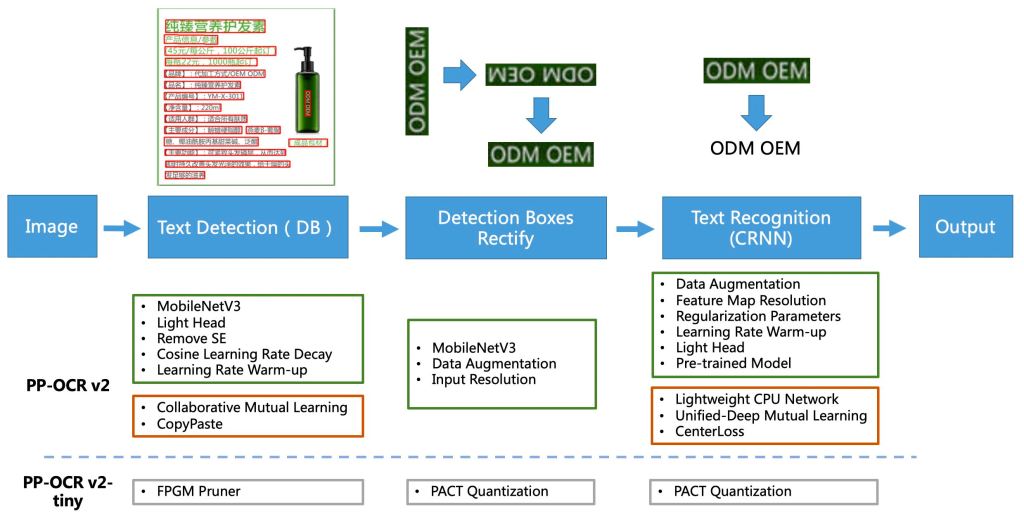
PaddleOCR Framework
Step 3: Post-Processing and Validation
The raw OCR output often includes irrelevant or extraneous text. Post-processing involves:
- Regex Matching:
- Extract fields such as name, address, license number, and expiration date.
- Example regex for license number:
- Simple Word Detection: Looking for specific key words that are in driver licenses, in the instance of Vietnam, looking for the specific Vietnamese words: GIẤY PHÉP LÁI XE
NGÀY SINH
QUỐC TỊCH
Scaling and Security Considerations
Scaling and Security Considerations
Scalability
- Deploying this system in a production environment involves considerations for scalability and latency:
- Batch Processing: Process large volumes of images in parallel using distributed systems.
- Setting up a scheduled batch job on off peak hours to run new driver registrations
- Edge Deployment: YOLO or similar lightweight models can run on edge devices, reducing cloud dependency and latency, running ML models on customers mobile phones is not typically recommended, but can be a possibility for light weight models
- Batch Processing: Process large volumes of images in parallel using distributed systems.
Security
- Data privacy is critical when handling personally identifiable information (PII). Best practices include:
- Encrypting sensitive data during transmission and storage
- Using secure endpoints when integrating with cloud-based OCR services.
Conclusion
By automating the driver registration process with computer vision and OCR, this system reduces manual intervention, enhances accuracy, and improves operational efficiency. The modular nature of the pipeline allows for easy customization and scalability, making it a robust solution for logistics and on-demand services.
Preprocessing Importance: Proper image preprocessing (e.g., rotation, scaling) can significantly improve downstream OCR performance.
Post-processing Complexity: Text extraction is not sufficient on its own; additional steps like regex matching and validation are necessary for real-world applications.
Integration with Cloud Services: Leveraging APIs from Azure, Google Cloud, or AWS reduces development time but requires careful consideration of costs and privacy implications.



 Jeremy Cheung Portfolio